
File Renderers for Bitbucket
Enhanced file preview capabilities for Bitbucket Cloud repositories. View CSV, TSV, PDF, STL, Bitbucket Pipelines, Mermaid, AsciiDoc, Jupyter Notebook, TeX, DOCX, XLSX, ODS, PPTX, ODT, ODP, and Creole files directly in your browser.
Contents
Overview
The File Renderers for Bitbucket app automatically enables enhanced viewing capabilities for supported file types in your Bitbucket Cloud repositories. Once installed, the app works seamlessly whenever you navigate to a supported file.
Supported File Types
- Pipelines – bitbucket-pipelines.yml
- Jupyter Notebooks – .ipynb files
- CSV & TSV – Tabular data values
- PDF – Portable Document Format
- STL – 3D model files
- Mermaid – .mmd, .mermaid diagram files
- Office & Documents – DOCX, XLSX, PPTX, ODS, ODT, ODP
- AsciiDoc – .adoc, .asciidoc, .asc files
- Creole – .creole wiki files
- TeX – .tex source files
Looking for Map Support?
For GeoJSON and TopoJSON files, check out our Map Viewer for Bitbucket app.
Installation
Install the File Renderers for Bitbucket app using the secure install link.
You need to be the admin of the Bitbucket workspace to install the app.
Why install via a direct link?
Bitbucket Cloud is transitioning to a new app framework (Forge). During this period, apps are distributed via direct installation links while the Atlassian Marketplace is being updated. Learn more about this update.
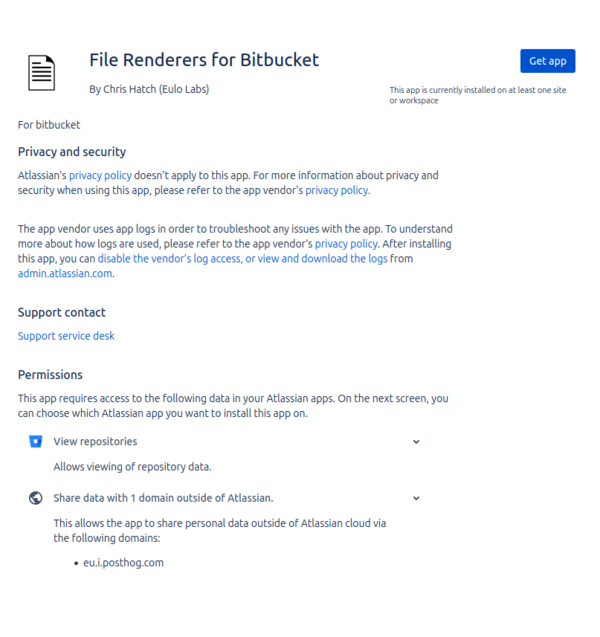
1. Grant Access
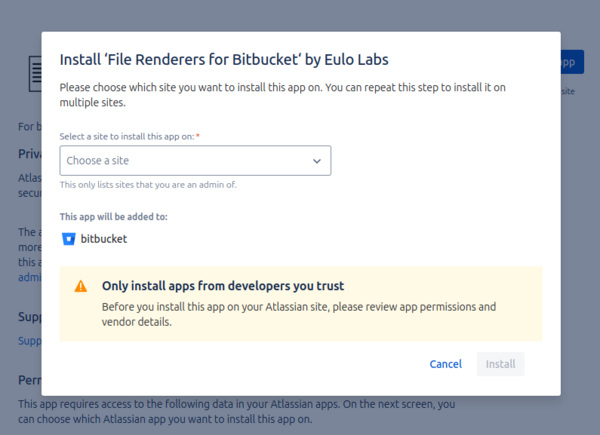
2. Confirm Installation
Selecting the Viewer
When viewing a supported file in Bitbucket, you can switch between the default Bitbucket view and the File Viewer using the dropdown menu at the top of the file preview.
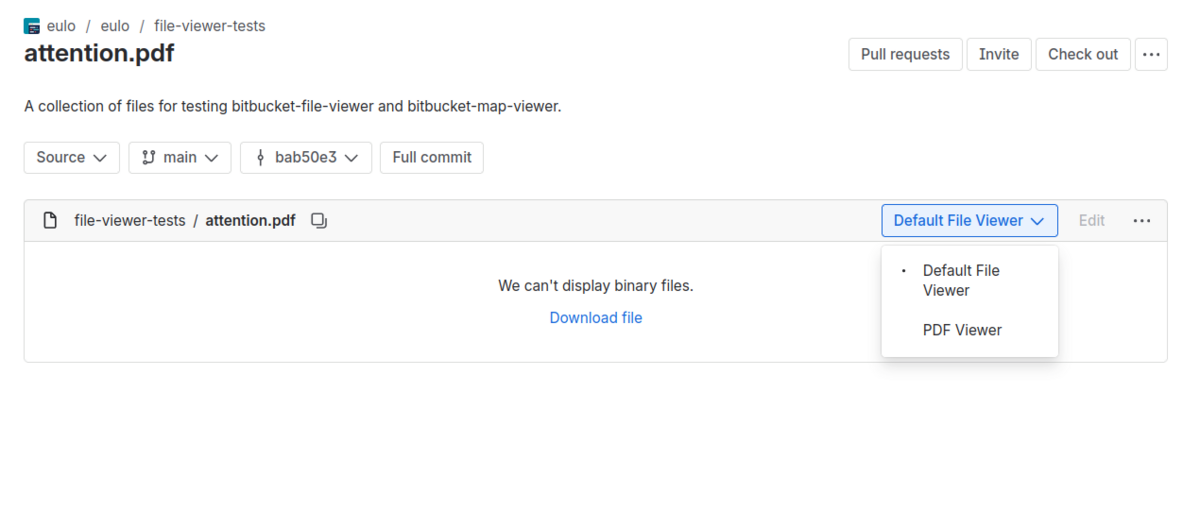
How to Select the Viewer
- Navigate to a supported file – Open any CSV, TSV, PDF, STL, AsciiDoc, Jupyter Notebook, Pipeline file, etc. in your repository.
- Look for the viewer dropdown – At the top of the file preview (see screenshot above), you'll see a dropdown menu showing the current viewer.
- Select the File Viewer option – Click the dropdown and choose the appropriate viewer to switch to the enhanced view.
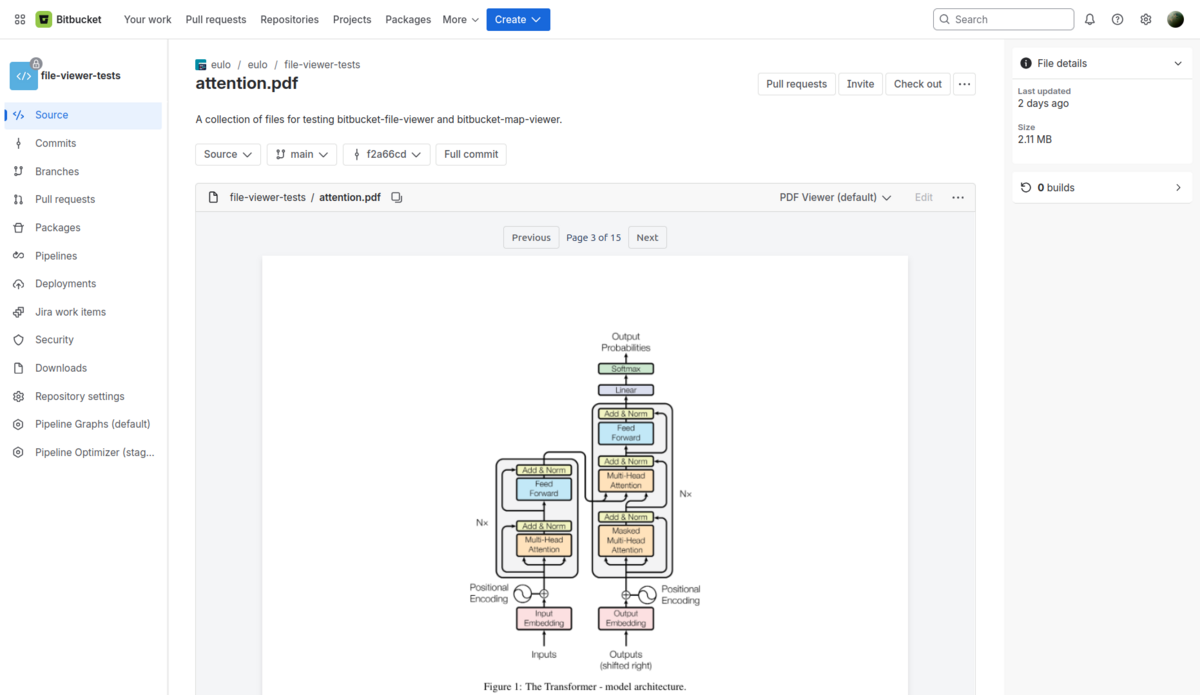
Then you should see the file rendered like below.
Pipelines Viewer
Visualise your bitbucket-pipelines.yml configuration as a clear, readable pipeline view. Instantly understand your CI/CD workflow without parsing YAML by hand.
Features
- Visual pipeline step breakdown – Includes stage grouping.
- Comprehensive pipeline elements – Shows triggers, caches, services, and artifacts.
- Advanced steps – Supports parallel steps, manual steps, and conditions.
- Handles complexity – Works with pipeline imports and shared configurations.
Jupyter Notebook Viewer
Render .ipynb notebooks beautifully in Bitbucket. View code cells, rich outputs, Markdown, LaTeX equations, and inline charts without leaving your repository.
Features
- Comprehensive rendering – Renders code, Markdown, and rich output cells.
- Rich media – Inline charts, images, and HTML output support.
- Math equations – Native LaTeX equation rendering.
- Syntax highlighting – Built-in highlighting for executed code cells.
CSV & TSV Files
The CSV and TSV viewers provide a clean, tabular view of your data files with enhanced readability, sortable columns, and navigation.
Features
- Table formatting – Data is displayed in a clean, easy-to-read table format with alternating row colors.
- Sortable columns – Click on any column header to sort the data in ascending or descending order.
- Header detection – The first row is automatically treated as headers and styled distinctly.
- Large file handling – Files with more than 10,000 rows are truncated with a clear indicator showing the data limit.
- Horizontal scrolling – Wide tables are scrollable to view all columns without breaking the layout.
PDF Files
View PDF documents directly in Bitbucket without downloading. The PDF viewer provides a native viewing experience with standard navigation controls.
Features
- Page navigation – Scroll through pages or use controls to jump to specific pages.
- Zoom controls – Adjust the zoom level to read documents comfortably.
- In-browser rendering – Documents are rendered entirely in your browser using PDF.js.
STL 3D Files
Preview 3D models directly in Bitbucket. The STL viewer provides an interactive 3D viewing experience for 3D models and 3D printing files.
Features
- Interactive rotation – Click and drag to rotate the model and view it from any angle.
- Zoom controls – Use mouse wheel or on-screen controls to zoom in and out.
- Pan view – Right-click and drag to move the model around the viewport.
- Three.js rendering – High-quality 3D rendering powered by the Three.js library.
Mermaid Viewer
Render .mmd and .mermaid diagram files as crisp, interactive SVG visuals. From flowcharts to sequence diagrams, view them all without any external tools.
Features
- Numerous diagram types – Supports flowcharts, sequence, class, state, Gantt diagrams, and more.
- Crisp SVG rendering – Interactive controls to zoom and pan the diagram.
- Advanced architectures – Entity-relationship, C4, and git graph diagrams supported natively.
- Raw source toggle – Effortlessly inspect the raw text definition of your diagram.
Office & Document Viewer
Preview common office and document formats directly in Bitbucket — no downloads or external applications required. Great for teams that store specs, proposals, and slide decks alongside their code.
Supported Formats
- DOCX – Word documents with rich text and formatting correctly applied.
- XLSX / ODS – Spreadsheets rendered as clean, readable, interactive tables.
- PPTX / ODP – Presentation slides rendered inline in Bitbucket for rapid previewing.
- ODT – OpenDocument text files displayed faithfully in a natural document viewer format.
AsciiDoc Files
Render AsciiDoc documentation beautifully with full formatting support, similar to how Markdown is rendered but with AsciiDoc's additional features.
Features
- Full AsciiDoc support – Headers, lists, tables, admonitions, code blocks, and more are rendered correctly.
- Syntax highlighting – Code blocks are rendered with proper syntax highlighting.
- Clean typography – Documents are rendered with clean, readable typography similar to GitHub-style rendering.
Creole Viewer
Render .creole wiki markup files as clean, formatted HTML. Perfect for teams migrating from Trac, Redmine, or other wiki-based systems.
Features
- Complete implementation – Full Creole 1.0 wiki markup specification support.
- Rich formatting – Headings, bold, italic, lists, and tables render smoothly.
- Embedded content – Inline links and image embedding.
- Code blocks – Preformatted code and nowiki blocks for accurate software documentation.
TeX Viewer
Preview .tex source files with beautifully rendered mathematical equations and structured document formatting — straight in your browser.
Features
- Precision math rendering – High-quality math rendering via KaTeX.
- Document structure – Renders sections, lists, and environments properly.
- Robust equation support – Inline and display mode equations both render beautifully.
- Academic use cases – Ideal for research papers, academic notes, and technical reports stored in version control.
Support
Need help? We're here to support you. Whether you have a question about features, need assistance with configuration, or want to request a new supported file type, please don't hesitate to reach out.
Ready to improve your Bitbucket experience?
Follow our installation guide to add these enhanced renderers to your workspace.